 Lattika
Window zones for a 49-inch super-ultrawide on a Mac
A 49-inch 32:9 display is two 27-inch monitors without the bezel in the middle. Halves and quarters waste that space: half of a super-ultrawide is still a whole monitor. Lattika splits it into the zones you need, from two virtual monitors to nine zones, and you drop windows into them with a Shift-drag.
14-day full trial · One-time purchase · Signed and notarized by Apple
Layouts made for 32:9
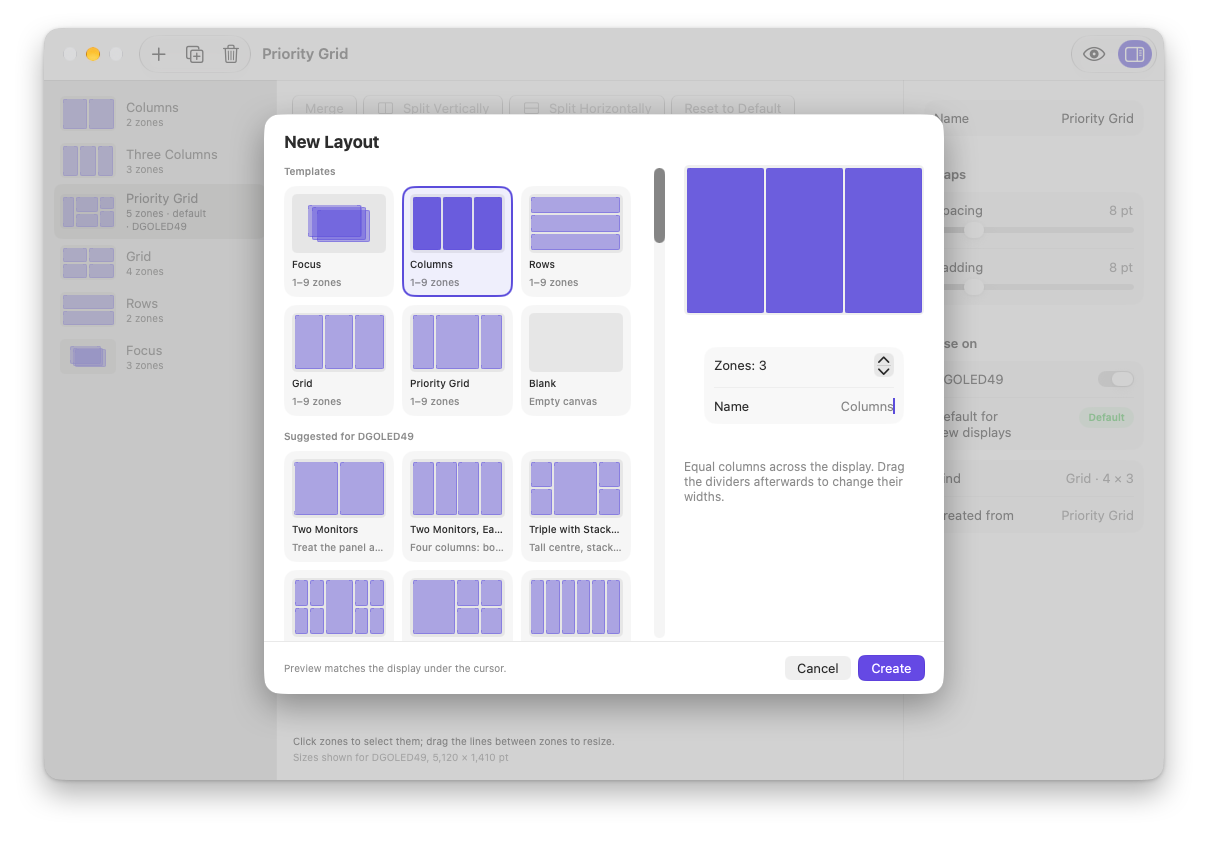
When Lattika sees a 32:9 display, the New Layout sheet suggests these presets first. Each is a starting point you can change in the editor.
| Preset | Zones |
|---|---|
| Two Monitors | The panel as two 16:9 screens. |
| Two Monitors, Each Split | Four columns: both halves split again. |
| Triple with Stacked Sides | A tall centre with stacked zones on both sides, five zones in all. |
| Command Center | A wide centre plus a 2 × 2 grid on each side, nine zones in all. |
| Monitor + Quads | The left half as one screen, the right half as four quadrants. |
| Six Across | Six columns for many narrow windows. |
| Eight Zones | Four columns by two rows. |
Ways to use the space
- Coming from two monitors? Start with Two Monitors and keep the habits you have.
- One main window, many helpers. Command Center keeps your work in the middle and chat, mail, music and notes in the side zones.
- Many narrow windows. Six Across fits terminals, logs, chats or documents side by side.
- Your own arrangement. Draw zones freely in the canvas editor, overlapping if you like.
Set it up in a minute
- Install Lattika and allow the Accessibility permission when it asks.
- Open the layout editor with ⌃⌥` and click New Layout (+). The presets for the displays attached right now are listed first.
- Pick a preset, then under Use on in the inspector, turn on your monitor.
- Hold Shift while dragging a window, and drop it into a zone. Add Control to stretch it across several zones.
Tips
- Docking a laptop. Each display keeps its own layout, and a MacBook remembers one layout for its built-in screen when docked and another when not.
- Every morning. When you plug the monitor back in, window memory returns windows to their zones; a workspace restores the whole desk with one click.
- Gaps. Spacing between zones and padding at the screen edges are set per layout, in points.
Questions
Can I split it into two virtual monitors? Lattika's Two Monitors preset gives you two zones, each the size of a 16:9 screen, and windows snap to either half. macOS still sees one display, so there is one menu bar and one Dock.
Which monitors does it work with? Any display macOS can use. Lattika recognizes an ultrawide display by its shape, not its brand, and suggests the matching presets.
Does it work with a curved monitor? Yes. Zones follow the screen's pixels; the curve makes no difference.